How to Use Google Flights to Score Cheap Flights (and Catch Mistake Fares Before They Disappear)
By Sunny S Pujari ·
In July 2023, a nonstop roundtrip from New York (JFK) to Paris on American Airlines dropped to $229. Not a typo. Not a points redemption. The fare normally ran around $850 — American just mispriced the ticket. It lasted a few hours before repricing, and everyone who jumped on it got to keep the fare.
The people who booked it weren't travel hackers running complicated points transfers through obscure airline partners. They were regular people who saw the deal, searched Google Flights, and booked before it disappeared.
If you've got a travel rewards card, you probably already know the basics — earn points on purchases, maybe cash in a sign-up bonus, redeem for travel. But there's a whole other side to getting cheap flights that has nothing to do with points: finding the right cash price at the right moment. And Google Flights is the best free tool for doing exactly that.
This guide will show you how to set up price alerts that catch those unicorn fares before they vanish, how to think about which fare class actually makes sense for your wallet, and a repositioning strategy that can save you hundreds on international flights.
Google Flights Price Alerts: The Most Important Feature for Cheap Flights
Let's skip straight to the feature that makes Google Flights worth using: price tracking.
Airfare prices change constantly — sometimes multiple times per day. Airlines misprice fares, run flash sales, or quietly drop prices on routes when demand is low. These deals don't last. A mistake fare might live for 2 hours. A flash sale might run for a day. If you're not watching, you'll never know it happened.
Google Flights solves this by watching for you.
How to Set Up a Google Flights Price Alert
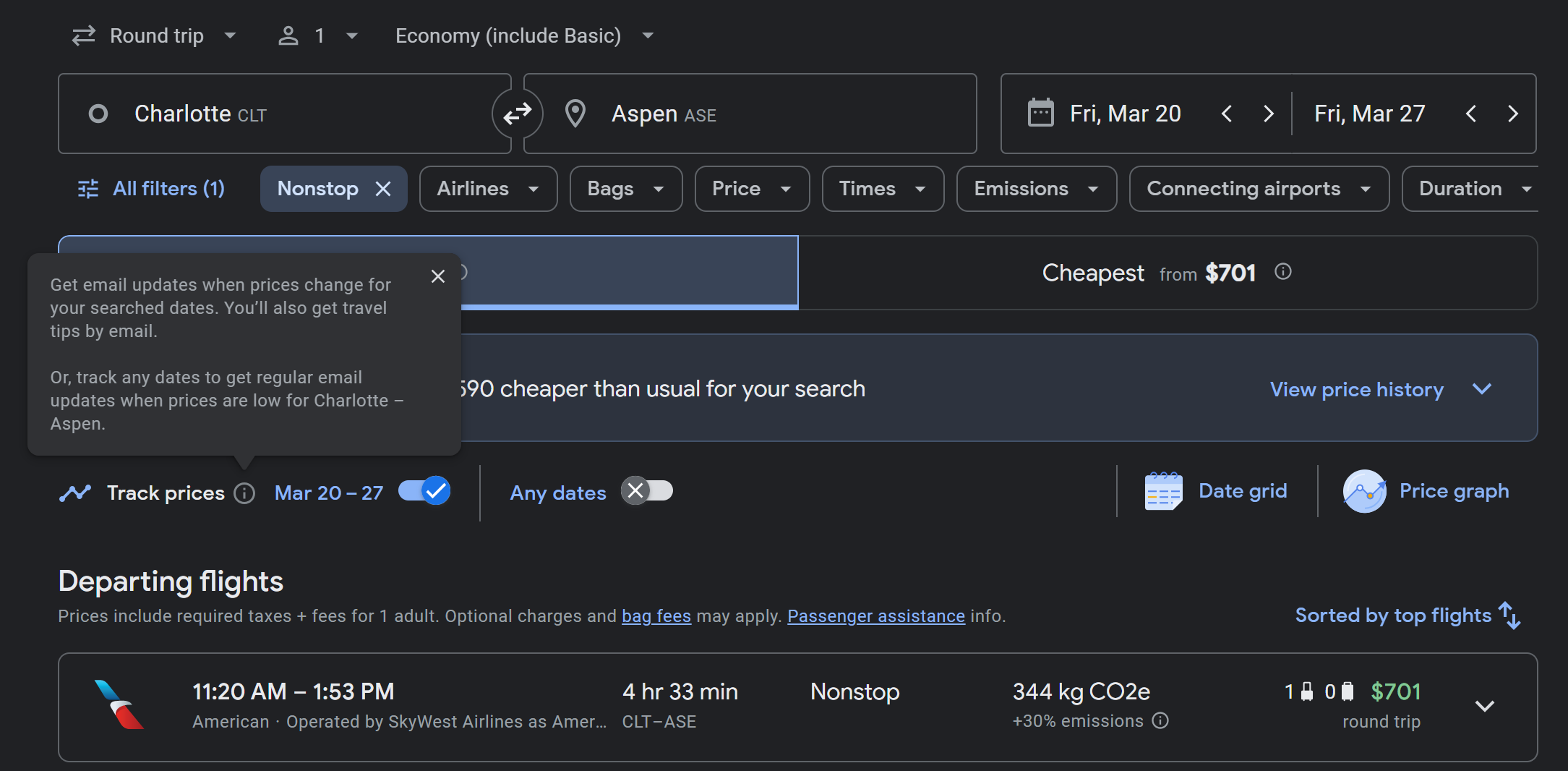
Go to google.com/travel/flights and search any route — say, your home airport to a destination you want to visit.
Once your results load, look for the "Track prices" toggle near the top of the results page. Flip it on.
That's it. Google will now email you whenever the price significantly drops (or rises) on that route.
You need a Gmail account for alerts, but that's the only requirement. No app to install, nothing to pay for.
Two Ways to Track Prices (and Why You Should Use Both)
Track specific dates when you know your travel window. Google will monitor that exact itinerary and notify you when prices shift. This helps you figure out the best moment to buy — is this fare low, typical, or high compared to history? Google's price analysis tells you exactly that, so you're not guessing.
Track "any dates" when you're flexible or dreaming. Toggle this option and Google will notify you whenever a cheap fare pops up on your route within the next 3–6 months. This is how people catch mistake fares and flash sales — you set alerts on 5, 10, even 15 dream routes and wait for something absurdly cheap to land in your inbox.
Use both. Track specific dates for trips you're actively planning so you know when the price is right. Track "any dates" on dream destinations so you're ready when a deal hits.
The Price History Chart: Your "Buy Now or Wait" Answer
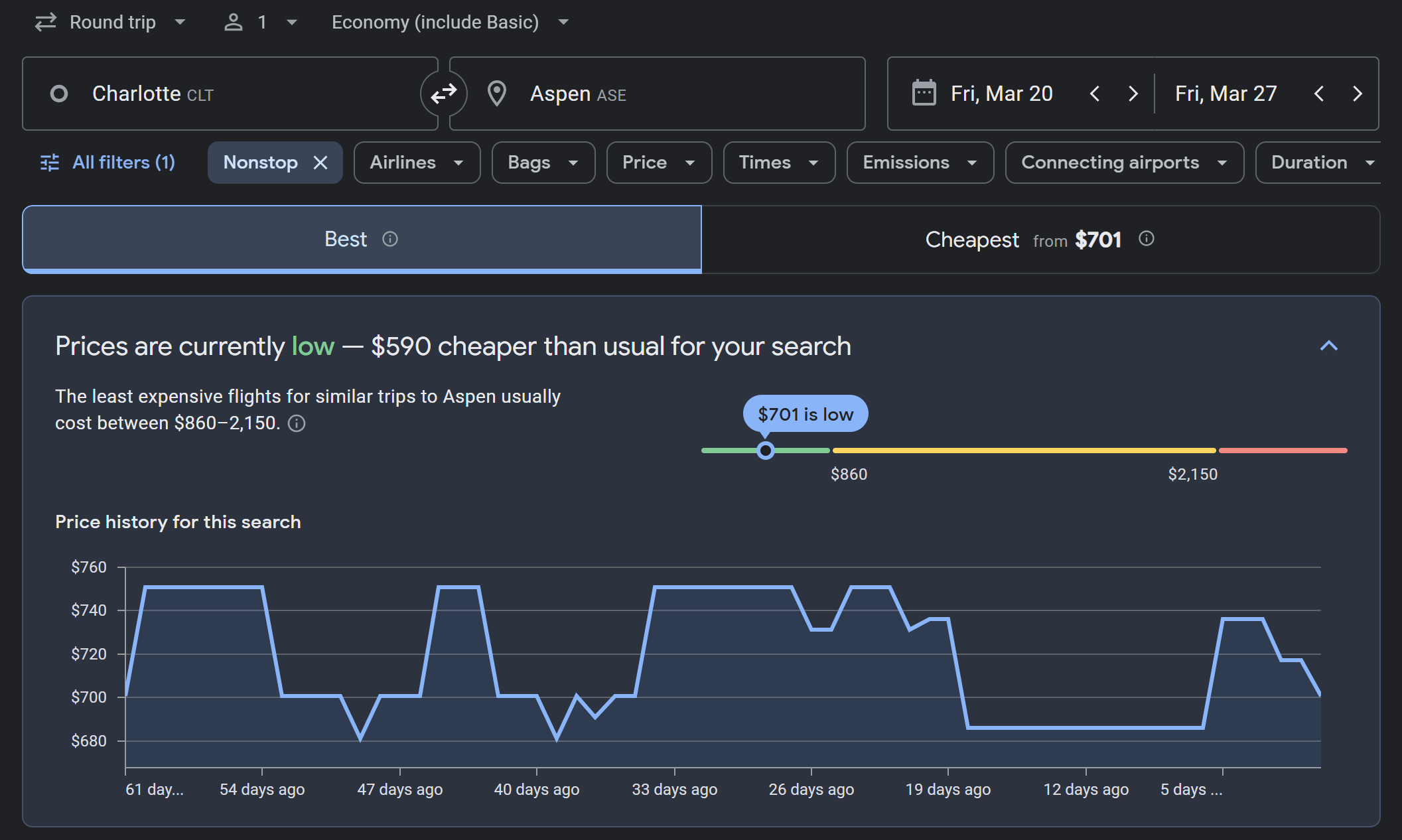
Once you're tracking a route, Google shows you a price history graph and labels the current price as "Low," "Typical," or "High" relative to historical data for that route.
This is the single best tool for answering the question every traveler agonizes over: "Should I book now or wait?"
If the price is low: Book it. You're getting a good deal relative to what this route normally costs.
If the price is typical: You're fine to book if your dates are firm. Set an alert in case it drops, but don't expect a dramatic swing.
If the price is high: Set the alert and wait if you can. Prices on this route have been lower before and are likely to come back down.
The Repositioning Strategy: Fly Out of a Different Airport and Save Hundreds
This is one of the most powerful and underused strategies for international travel, and Google Flights makes it incredibly easy to test.
The idea is simple: instead of only searching from your home airport, check what the same flight costs from other major international gateways. If there's a big enough price difference, you book a cheap domestic or short-haul flight to that gateway and fly the long-haul segment from there.
How to Search Multiple Airports on Google Flights
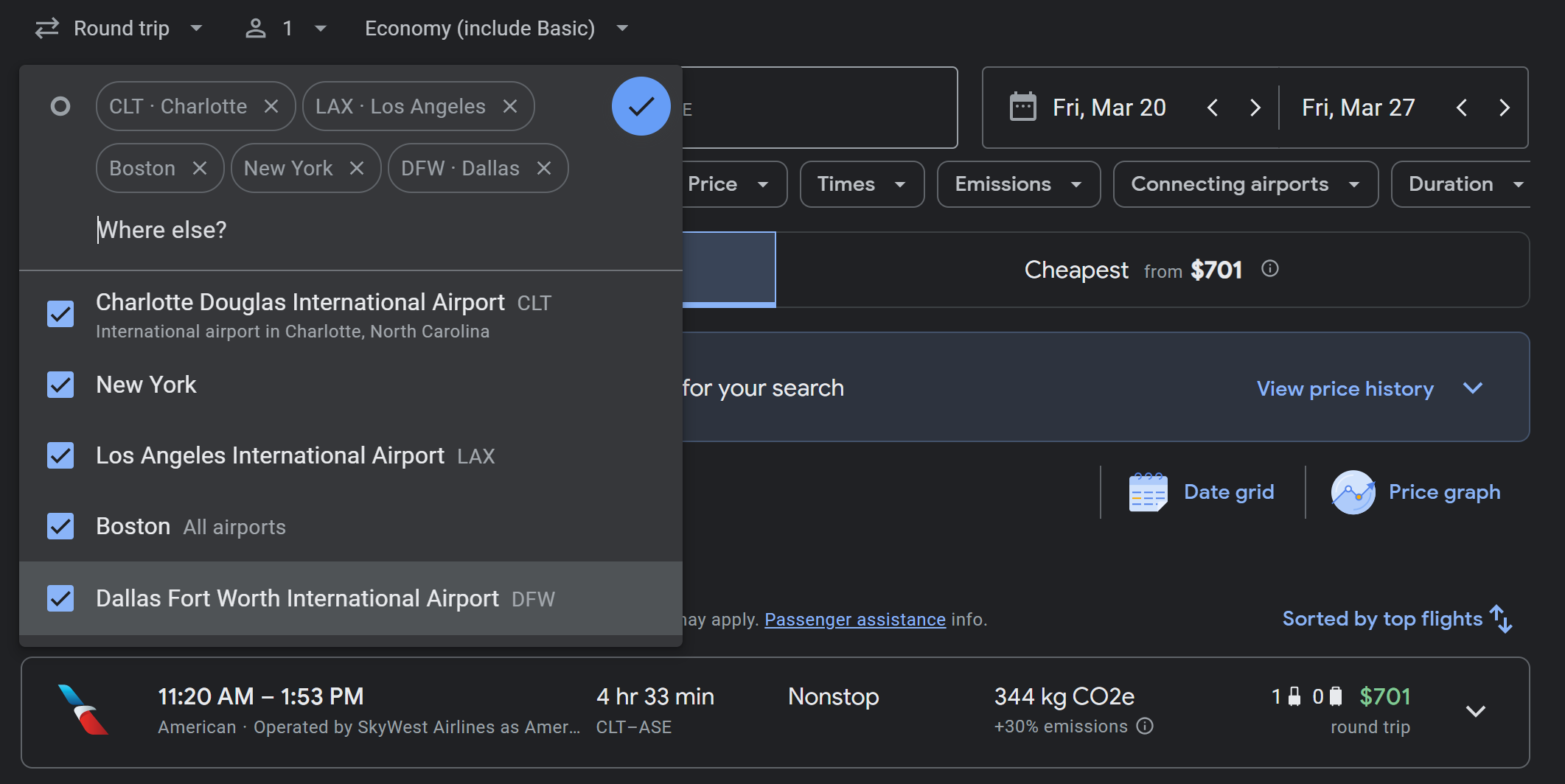
Google Flights lets you search up to seven departure airports and up to seven destination airports in a single search. Just type additional cities separated by a comma or click the "+" next to the airport field. Google will show you the cheapest options across all of those airports at once.
This one feature can surface price differences of $200–$500+ on international fares, because airlines price routes from different gateways very differently based on competition and demand.
Real Examples of When to Reposition
Boston to Tokyo: A nonstop from BOS to Tokyo can run $1,400+ roundtrip. But add San Francisco (SFO), Seattle (SEA), Los Angeles (LAX), New York (JFK), and even Vancouver (YVR) to your search. All of those airports have nonstop service to Tokyo, and depending on the time of year, one of them could be $400–$600 cheaper. A $150 positioning flight from Boston to SFO plus a $900 SFO-Tokyo fare still beats a $1,400 nonstop from Boston by $350.
East Coast to New Zealand: Auckland is a long haul from the East Coast, and only JFK offers nonstop service. Add LAX, SFO, DFW, and JFK/EWR as departure options. West Coast gateways like LAX and SFO often price significantly cheaper for South Pacific routes because there's more airline competition on those segments. A positioning flight to LAX plus the cheaper long-haul fare can easily save you $300–$500 versus routing everything through JFK.
Midwest to Europe: If you're in a city like Cincinnati, Indianapolis, or Nashville, check what flights to Europe cost from Chicago (ORD), New York (JFK/EWR), or even Canadian airports like Toronto (YYZ) or Montreal (YUL). European carriers like Norse Atlantic and Icelandair offer aggressive pricing out of specific gateways, and a budget positioning flight to reach them can make the total trip significantly cheaper.
Why This Works So Well
Airlines set fares based on competition at each hub. A route with three competing carriers is almost always cheaper than a route where one airline has a monopoly. Major international gateways — SFO, LAX, JFK, SEA, ORD — tend to have the most competition on long-haul routes, which means the best prices.
And by the way, this same logic works when you're searching for points bookings too. If you're ever trying to use miles for an international trip, checking availability and pricing from multiple gateway cities can surface much better redemption rates.
A Tip on Booking Positioning Flights
Book your positioning flight separately from the international leg — don't combine them into one ticket unless the through fare is genuinely cheaper. Booking separately gives you more flexibility, lets you take advantage of budget domestic carriers (Southwest, Frontier with a carry-on), and means you can use the best credit card for each purchase. Just leave enough time between flights to account for delays — at least 3–4 hours for a domestic connection before an international departure.
How to Search Google Flights Like a Pro
Beyond the repositioning strategy, there are several features worth knowing about.
Use the Google Flights Calendar and Date Grid
Click on your travel dates and Google shows a two-month calendar with prices highlighted on each day. Green dates are the cheapest. Sometimes shifting your trip by a single day saves $50–$200.
The date grid view is even better — it's a color-coded matrix showing every combination of departure and return date. You can spot the absolute cheapest travel window in seconds. If you have any flexibility on dates, this feature alone can pay for your hotel.
Click "Cheapest" Instead of "Best"
Google defaults to sorting results by "Best," which balances price and convenience. Click the "Cheapest" tab to sort strictly by price. You might find a slightly longer layover or a different carrier that saves you $200.
Use the Filters That Matter
Google's filter bar is excellent. The ones worth using:
Bags — Filter for "free carry-on" to weed out ultra-basic fares where a carry-on costs $50+ each way. A $29 Spirit fare isn't $29 once you add bags.
Stops — Set to "Nonstop only" if that's a priority, or "1 stop or fewer" for a wider range of prices.
Airlines — Exclude carriers you don't want, or filter by a specific airline or alliance.
Times — Avoid red-eyes or super-early departures.
Basic Economy filter — A newer option that hides stripped-down basic economy fares entirely (available for U.S. and Canada flights).
Check What You're Actually Getting
Click the dropdown on any flight result and Google shows legroom (in inches), entertainment options, the charging situation (USB, power outlet, or nothing), and Wi-Fi availability. A small fare difference might buy you meaningfully more comfort.
Google Flights Explore: Find Cheap Flights When You're Open to Anywhere
No destination in mind? Click "Explore" in the top nav. Google shows a world map with the cheapest roundtrip fares from your airport pinned to each destination. Set a budget, a rough date range, and whether you want domestic or international. It's the fastest way to answer: "Where can I actually go for cheap right now?"
Basic Economy vs. Main Cabin: When to Pay Up (and When Not To)
Airlines want you to believe that basic economy is a punishment and main cabin is the "smart" choice. The truth is more nuanced — and for many flights, basic economy is the best deal on the board.
Basic Economy Is the Right Call More Often Than You Think
If you're flying a route you're committed to, you're not checking a bag, and you don't need to pick your seat — basic economy is the cheapest way to get there. That's it. You get on the same plane, fly to the same destination, and arrive at the same time as everyone else.
Yes, airlines have been stripping perks from basic economy. Delta stopped awarding SkyMiles on basic economy back in 2022. United just announced (this week, actually) that starting April 2, 2026, basic economy tickets won't earn MileagePlus miles unless you hold a United credit card or have elite status. American has made similar restrictions.
But here's the thing: airline miles earned directly from flying are often not worth the premium you'd pay to move up to main cabin. If the difference between basic and main cabin is $155 on a domestic flight, and you'd earn maybe 600 airline miles by upgrading, those 600 miles are worth about $6–$9. That's a terrible trade.
Your travel rewards credit card points — Chase Ultimate Rewards, Amex Membership Rewards, Capital One Miles, or whatever you're earning — are typically more valuable per dollar spent than the airline miles you'd earn on the flight itself. You earn those card points on the purchase regardless of fare class. A $300 basic economy ticket on your 3x travel card earns you 900 points. A $455 main cabin ticket earns you 1,365 points. Yes, the main cabin ticket earns more card points, but you also spent $155 more to get there. The math favors booking cheap and letting your card do the earning.
When Main Cabin Makes Sense
Main cabin isn't always a bad deal — it just needs to justify its price. Here are the situations where paying more is worth it:
You want the ability to cancel for an eCredit. Main cabin tickets on most U.S. airlines can be canceled without a fee, and you get the full fare back as airline credit. This matters when you're booking a flight that isn't at its cheapest and you think the price might drop — or if there's a chance your plans could change. (If travel disruptions happen — weather, cancellations, airline operational issues — fee waivers typically apply regardless of fare class, so basic economy passengers aren't left stranded.)
You're checking a bag and it's included in main cabin. If main cabin includes a free checked bag on your airline and route, and you'd otherwise pay $35–$70 for a bag on basic economy, the effective price gap shrinks a lot. Do the math on your specific flight.
Seat selection matters to you. Traveling with a partner or family and you want to sit together? Main cabin usually lets you pick seats at booking. Basic economy assigns seats at check-in, which could mean middle seats in separate rows.
You spotted a fare on the higher end of the price chart and want repricing flexibility. This is where the post-booking price alert strategy comes in. If you're booking when Google tells you the price is "Typical" or "High" and you think it'll come down, book main cabin so you have the option to cancel and rebook if the fare drops. Keep the Google Flights alert running, and if the price falls, cancel and rebook to pocket the difference as an eCredit for your next trip. This only works with main cabin and above — basic economy tickets generally can't be changed or canceled without a steep penalty.
When the Repricing Strategy Doesn't Make Sense
If you're already booking at a price Google labels "Low," there's not much room for the fare to drop further. In that case, basic economy is almost always the right call. You got a good price, you know you're going — just book the cheapest option, put it on your travel card for the points and protections, and move on.
The repricing play is specifically for situations where you have to book now (dates are firm, inventory is limited) but the price feels elevated and you'd like the option to recapture savings later.
Your Credit Card Is Already Your Safety Net
One more reason not to overpay for fare flexibility: your travel rewards card likely already covers the things you'd worry about.
Most mid-tier and premium travel cards include:
Trip delay protection — covers hotel stays, meals, and essentials if your flight is delayed beyond a certain threshold (often 6–12 hours).
Trip cancellation/interruption insurance — reimburses non-refundable travel costs if you have to cancel for a covered reason like illness, injury, or severe weather.
Baggage delay or loss coverage — covers essentials if your bags are delayed or lost.
These protections apply regardless of whether you booked basic economy or main cabin. So the scenario where you'd need a fully refundable ticket — a true emergency cancellation — is already partially covered by the card in your wallet.
Between your card's travel protections and the airline's own fee waivers during irregular operations, you're covered for the vast majority of things that could go wrong. Skip the flexible fare upsell. Put that $500+ savings toward the trip itself.
Airlines You Won't Find on Google Flights
Nearly every airline shows up on Google Flights now, including Southwest (which was famously absent for years). A handful of carriers are still missing — mainly some Asian airlines like Air China, China Eastern, and Thai Airways. For those, check their websites directly.
For the vast majority of domestic and international routes, Google Flights has you covered.
Your Google Flights Playbook
Here's the full workflow, start to finish:
Set "any dates" price alerts on 5–10 dream destinations. This is your passive deal-catching machine for mistake fares and flash sales.
When planning a specific trip, search with multiple airports — especially for international travel. Check major gateways like SFO, LAX, SEA, JFK, ORD, and even Canadian airports to find the cheapest long-haul segment.
Use the calendar and date grid to find the cheapest travel window.
Filter for what matters — free carry-on bags, nonstop flights, preferred airlines.
Check the price history chart — is this fare low, typical, or high?
If the price is low: Book basic economy (unless you need a checked bag or seat selection). Put it on your travel rewards card. Done.
If the price is typical or high and you have flexibility: Book main cabin so you can cancel and rebook if the price drops. Keep the price alert running after you book.
If the price drops after booking main cabin, cancel and rebook at the lower fare. Pocket the difference as an eCredit for your next trip.
Skip the flexible/refundable fare — your credit card's travel protections and the airline's standard cancellation policies on main cabin already have you covered.
The Bottom Line
You don't need to be a points expert to fly cheap. You don't need to understand transfer partners or spend hours on deal forums. You just need Google Flights price alerts, a sense of when to book basic economy versus main cabin, and a travel rewards card that backs you up when plans change.
Set the alerts. Watch for the deals. Book fast when the price is right. And for those dream destinations? Be patient — the fare you want is out there, and when it drops, Google will tell you.